
What You’ll Discover
– How to pair a LiftMaster remote to your opener in a matter of minutes.
– Common Reasons Your Remote Control Is Acting Up
– How to properly change out an old battery.
– How to select a replacement remote that will actually work with your equipment.
– Handy checklist to troubleshoot before you shell out for a new one.
– When the job is best left to the professionals.
A LiftMaster garage door remote is one of those little gadgets that you don’t think about much until it stops working and suddenly getting into your garage is a problem. The good news? Most problems come down to a few basic issues: A dead battery, a weak signal lost in the noise, a missed programming step, or a remote that is simply a poor match with your opener.
This guide covers everything from pairing a remote to swapping out the battery, to compatible replacements, and the usual headaches homeowners run into. By the time you’re done reading, you’ll be well prepared to troubleshoot your remote and when to call a garage door opener expert.
How does the remote communicate with the opener?
All LiftMaster remotes communicate with your opener through a wireless link that utilizes rolling-code security. Each time you press a button it creates a new code , never the same code twice . If that code matches the expectation of the opener’s receiver, the door will open or close.
But the fact is that LiftMaster has released several versions of this Security+ technology over the years. So a remote designed for one generation of openers may not be compatible with another. Ensure your remote is compatible with your specific opener model before you try pairing or replacing anything. Also, check the color of the Learn button, that’s usually the fastest way to tell if they’ll work together.
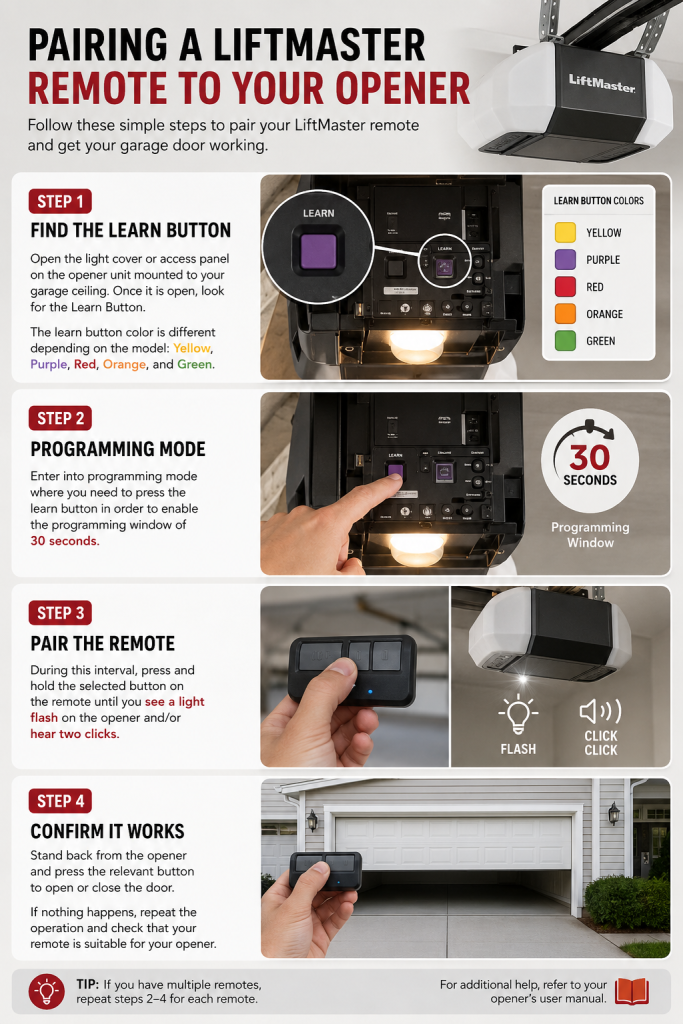
Pairing a LiftMaster Remote to Your Opener
Step 1: Find the Learn Button
Open the light cover or access panel on the opener unit mounted to your garage ceiling. Once it is open, look for the Learn Button. The learn button color is different depending on the model: Yellow, Purple, Red, Orange, and Green.
Step 2: Programming Mode
Enter into programming mode where you need to press the learn button in order to enable the programming window of 30 seconds.
Step 3: Pair the Remote
During this interval, press and hold the selected button on the remote until you see a light flash on the opener and/or hear two clicks.
Step 4: Confirm It Works
Stand back from the opener and press the relevant button to open or close the door. If nothing happens, repeat the operation and check that your remote is suitable for your opener.
Changing the Battery
A remote that is slow or has a short range oftentimes simply needs a battery change. It can be done in a few minutes.
Step 1: Open It
A flathead screwdriver or a coin should do the trick.
Step 2: Take Out the Old Battery
LiftMaster remotes often use batteries of the following types: CR2032, CR2025, and CR2016. Your task is to check what type your LiftMaster remote has. It may be different among LiftMaster remotes.
Step 3: Put in the New Battery
Insert it properly. In most LiftMaster remotes, the + (positive) side should face the up when the case is closed.
Step 4: Close It And Check
Put the case back in its place and test it. In most cases, swapping the batteries will not affect the remote programming.
Choosing the Right Replacement Remote
Compatibility is key here, so it’s best to take your time and get it right.
Begin with the model number of your opener. It can be found on the opener’s housing, and it determines the use of corresponding remotes.
Next, check the color of the Learn button. LiftMaster has changed its radio technology over the years, so knowing the color is one of the first ways to eliminate incompatible remotes.
Lastly, figure out how many buttons you need:
1-Button: a single garage door
2-Button: two garages
3-Button: three garage doors or a gate as well.
Simply go with Universal Remote
Universal remotes are created in such a way that they are suitable to work with various generations of LiftMaster openers hence making replacing anything old a hassle-free experience. It is, however, advisable to check if the remote is compatible with your opener before buying it.
Troubleshooting: The Common Issues Homeowners Face
If you’re facing some problem with your remote, rest assured that you are not alone in this. In fact, most of the so-called complaints come down to just a few main causes like dead battery or malfunctioning programming, or some disruption in the signal. You can spare yourself the trouble of unnecessarily ordering a brand new remote control if you do a little troubleshooting first because a good portion of these problems can solve itself if you just follow a few simple steps.
The Remote Won’t Program
Likely causes:
- Remote isn’t compatible with your opener
- Learn button wasn’t pressed cleanly
- The 30-second window closed before you finished
- Opener’s memory is full
Try this:
- Confirm your opener’s model number
- Match the remote to the Learn button’s color
- Press and release the Learn button just once
- Press the remote button within that 30-second window
- Still stuck? Run the whole process again
The Remote Does Nothing at All
Likely causes:
- Dead battery
- Battery installed backward
- Grimy or corroded contacts
- Internal damage
- No power in the opener
Try this:
- Change correctly-sized battery
- Check if the battery is inserted properly
- Wipe down the battery contacts
- Test a different remote, if you have one
- Check that the opener is actually powered
The Remote Only Works Up Close
Likely causes:
- Weak battery
- Radio interference nearby
- Damaged antenna on the opener
- Aging internal components
Try this:
- Replace the battery
- Make sure the opener’s antenna hangs freely, not tangled or blocked
- Move Wi-Fi routers and other wireless gear farther from the opener
- Swap out nearby LED bulbs, which can sometimes cause interference
The Remote Works Sometimes
Likely causes:
- Loose battery connection
- Weak battery
- Environmental factors
- Buttons wearing out
Try this:
- Replace the battery
- Clean the contacts
- Test each button individually
- Reprogram if the issue persists
- Note any problems observed in certain locations or at a particular time.
The Door Opens Fine but Won’t Close
Likely causes:
LiftMaster openers include safety features that stops the door from closing when something isn’t right:
- Misaligned safety sensors
- Dirty photo-eye lenses
- Something in the door’s path
- A wiring problem at the sensors
Try this:
- Clear anything blocking the doorway
- Wipe down the sensor lenses
- Re-align the sensors so they face each other properly
- Confirm both sensor indicator lights are lit
The Remote’s LED Blinks, But the Door Doesn’t Move
Likely causes:
- Lost programming
- There’s a trouble in the receiver
- Remote/opener mismatch
- Opener has a power issue
Try this:
- Reprogram the remote
- Confirm the opener has power
- Test the wall control panel
- Double-check compatibility with your opener model
The Remote Just Stop Working Without Warning
Likely causes:
- Dead battery
- Vacation Lock switched on
- Recent power outage
- Programming memory reset
Try this:
- Install a new battery
- Check whether Vacation Lock is active on the wall panel
- Confirm if the opener has power
- Reprogram if needed
In the event that you have attempted the precautions described above and your remote is still malfunctioning, the problem could be originating from faulty wiring within the opener’s receiver or from an issue relating to another part inside the system. Since electrical equipment like this could be used alongside components that protect it, enlisting a garage door expert might be necessary to fix the problem in such complicated situations.
Conclusion
A LiftMaster garage door remote is something so simple, yet it has a crucial role to play until a dead battery, signal issue, or compatibility problem intervenes. Fortunately, most of these problems can be easily fixed by following what has been detailed in this guide.
If you have already swapped the battery, checked the compatibility, and even tried reprogramming, you might need to think about getting a new remote or calling a technician.
FAQs
How do I program my LiftMaster garage door opener remote?
Find the learn button in your opener. Push it once and then push the button in your remote within 30 seconds. If there’s a blinking light or double beep, it worked.
Does changing the battery wipe the memory in my remote?
No. Most of the time, any battery changes do not erase the previous settings. Just replace it and forget about it.
What could have caused the malfunctioning of my remote after replacing the batteries?
There are a few possibilities. Firstly, it is possible that the battery was inserted incorrectly. Secondly, the remote could need reprogramming. Thirdly, it could be incompatible with the opener. Fourthly, there might be a problem with the power supply or receiver.
Is it possible to control multiple garage doors using a single LiftMaster remote?
Absolutely. A number of LiftMaster remotes come with either two or three programmable buttons making it easier to operate different doors or gates through just one remote.
What is the lifespan of a LiftMaster remote battery?
For the most part, it lasts for a period between two to five years, which is dependent on the user’s habits, environmental conditions, and type of battery. Once you start noticing the signal drop, it is recommended to replace the battery for good.