
Main Points
-Programming most Chamberlain remote controls takes just a few minutes using a simple Learn button.
-Dead batteries, interference issues, and programming errors account for most of the remote problems.
-Changing batteries on a regular basis helps your remote work properly.
-Not all Chamberlain remotes work with every opener, so make sure that your remote is compatible with your opener before buying one.
-Although the programming is fairly simple to manage, the internal repair of your door opener unit must be done by certified technicians.
-Making sure that firmware (for smart models) is up to date helps your door opener work properly.
An effective Chamberlain garage door opener remote control is quite useful as it makes life much easier. With just pressing a button allows you to open or close the door without stepping outside of your automobile. However, if your remote stops working or you are installing a new one, you need to know how to set it up properly.
If you bought a new Chamberlain garage door opener remote and need assistance with Chamberlain garage door opener programming, or learning the easy ways to solve the most common problems, check this guide for everything homeowners need to know.
You will learn how Chamberlain remote controls operate, how to pair them with the garage door opener, when to change the battery, the most common troubleshooting procedures, and when to involve a garage door expert.
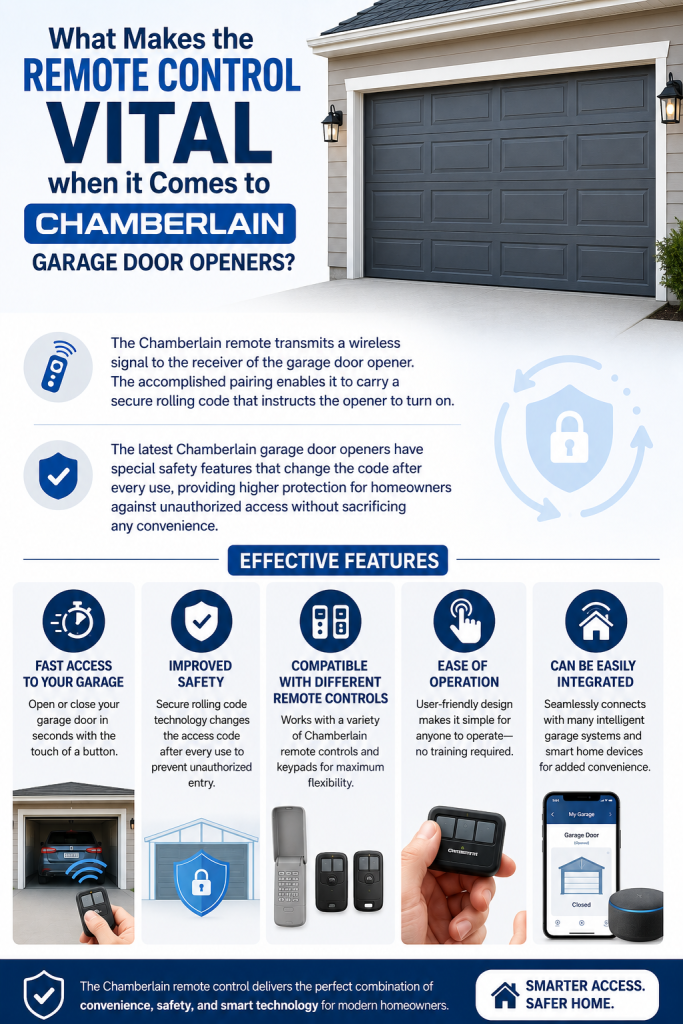
What Makes the Remote Control Vital when it Comes to Chamberlain Garage Door openers?
The Chamberlain remote transmits a wireless signal to the receiver of the garage door opener. The accomplished pairing enables it to carry a secure rolling code that instructs the opener to turn on.
The latest Chamberlain garage door openers have special safety features that change the code after every use, providing higher protection for homeowners against unauthorized access without sacrificing any convenience.
Effective features:
-Fast access to your garage
-Improved safety
-Compatible with different remote controls
-Ease of operation
-Can be easily integrated with lots of intelligent garage systems
How can you determine if a certain Chamberlain remote will work with your garage door opener?
You need to remember that not every remote controls every type of door opener.
Compatibility is dependent on:
-Year of manufacture
-Color of learn button
-Security technology
-Frequency of a garage door opener
Check the Learn Button Color
The easiest way to determine compatibility is by locating the Learn button on the motor unit.
Also, always compare your opener model with the remote’s compatibility list before purchasing.
| Learn Button Color | Typical Compatibility |
| Yellow | Security+ 2.0 openers |
| Purple | Security+ openers |
| Red/Orange | Older Security+ systems |
| Green | Billion Code systems |
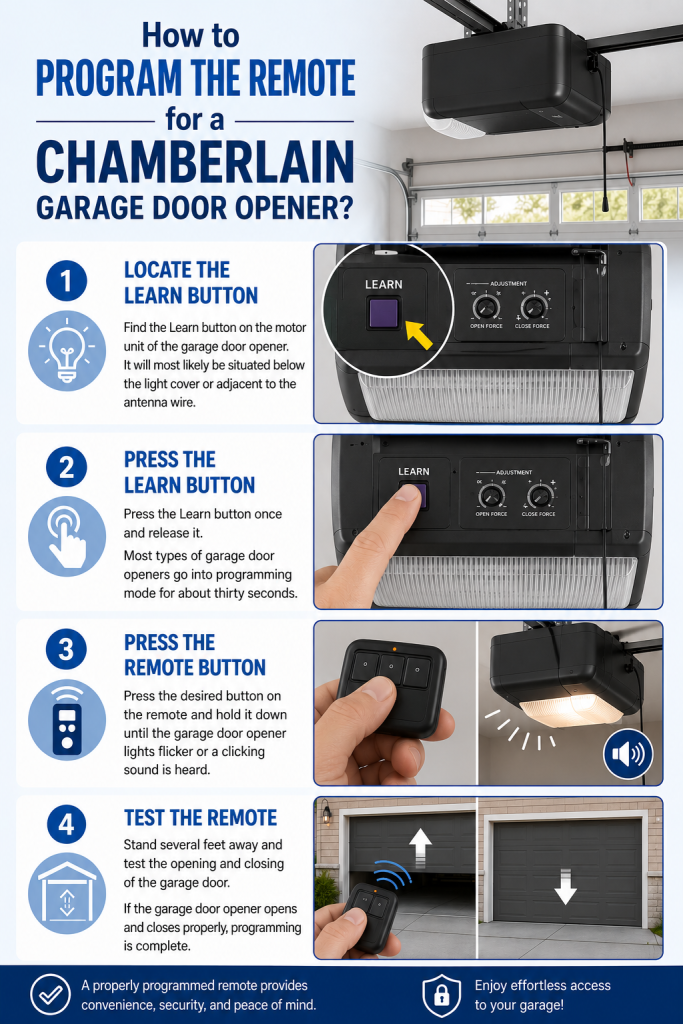
How to Program the Remote for a Chamberlain Garage Door Opener?
Step 1: Locate the Learn Button
Find the Learn button on the motor unit of the garage door opener. It will most likely be situated below the light cover or adjacent to the antenna wire.
Step 2: Press the Learn Button
Press the Learn button once and release it.
Most types of garage door openers go into programming mode for about thirty seconds.
Step 3: Press the Remote Button
Press the desired button on the remote and hold it down until the garage door opener lights flicker or a clicking sound is heard.
Step 4: Test the Remote
Stand several feet away and test the opening and closing of the garage door.
If the garage door opener opens and closes properly, programming is complete.
How to Program Chamberlain Garage Door Opener with Several Remotes
Most Chamberlain devices accommodate several remote controls, each of which has to be programmed using the Learn button.
You’ll have to repeat the programming procedure for:
-Extra remote controls for cars
-Remote controls owned by other family members
-Keychain remotes
-Wireless keypads
When to Change the Battery in Your Chamberlain Garage Door Opener
The weak Chamberlain garage door opener battery often results in the failure of the remote control.
Common signs are given below:
-Limited distance range
-Unpredictable responses
-The need to push the button several times
-The LED starts to fade
-The remote stops working altogether
The average remote control battery can work for a period of two to five years, depending on the conditions. Replacing the battery is easy and effective, however, a garage door opener technician can solve a lot of remote control problems effectively.
Why Isn’t My Chamberlain Garage Door Opener Remote Functioning?
Dead Battery: A dead battery is a most common issue. That’s why you must use a correct battery that is specified for your remote.
Lost Programming: Power outages, opener replacement, or resetting could erase the remote memory. So typically, reprogramming is the solution.
Information on signal interference: Electronic devices in the vicinity can disrupt signals from radio frequency. That is why it is good to test the remote close to the actual opener, as this will allow one to know if signal interference is the issue.
Examples of devices that can disturb signals from the remote include:
-LED bulbs
-Wi-Fi devices
-Wireless security devices
-Metal obstructions
Defective remote: The remote might have been subjected to physical issues and damaged internally. If changing the battery and resetting the remote is not successful, remote replacement is one of the practical solutions.
Problems with the opener: The cause of the issue might be something else. It is possible that the receiver is malfunctioning, or the system’s logic board might have an issue with the safety mechanism. If the wall controls do not work, there’s a chance that it needs to have checked by a professional.
Frequent Programming Errors with Chamberlain Garage Door Openers
Programming comes with the possibility of making some mistakes. This is why closely following the manual instructions usually helps to solve the issues.
The mistakes you should avoid:
-Pressing the learn button for too long (which later can lead to loss of currently working remotes)
-Using an incompatible remote
-Waiting too long after pressing the learn button on the opener
-Programming while standing at a far distance from the operator
-Inserting the battery incorrectly
What If You Need to Fix Chamberlain Garage Door Opener Issues?
-The motor of the opener will not operate
-The control panel is not working
-Doors accidentally reverses
-Diagnostic signal indicators are blinking
-Equipment failure
-Faulty mechanical
In these situations, it is advisable to contact a professional garage door repair service to assess the issues related to electrical equipment and moving parts.
Smart Features Available on New Chamberlain Garage Door Openers
Most contemporary Chamberlain models provide more than just ordinary remotes.
Key features include:
-Smartphone control
-Notification about movements
-Presence of guest access
-Scheduled closing option
-Integration with the voice assistant
-Remote monitoring
Chamberlain Remote Maintenance Checklist
Following a simple maintenance routine helps extend the life of your remote.
| Maintenance Task | Recommended Frequency |
| Replace battery | Every 2 to 5 years or as needed |
| Test remote range | Monthly |
| Clean remote exterior | Monthly |
| Inspect buttons | Every 6 months |
| Check opener response | Monthly |
| Replace damaged remote | As needed |
Troubleshooting Checklist
Before concluding that there is something wrong with your remote, go through this checklist:
✅ Make sure the battery has been installed correctly.
✅ Replace the battery if it’s more than two years already.
✅ Check whether the remote is compatible with your door opener.
✅ Reprogram the remote using the Learn button.
✅ Test the remote closer to the door opener.
✅ Find out whether the wall button is still functioning.
✅ Ensure that the door opener does not have any diagnostic lights flashing.
✅ Try to eliminate any sources of radio frequency interference if possible.
Always take note that if the problem persists, find a professional garage door company.
Conclusion
A reliable Chamberlain garage door opener remote can give daily convenience, security, and peace of mind. In most cases, installing and programming a Chamberlain garage door opener is uncomplicated for homeowners, while regular battery replacements and compatibility checks can help with several problems.
However, if the remote does not operate even after a battery replacement has been completed, compatibility confirmed, and programming done, it may mean that the problem originates from the opener. In this case, having a qualified garage-door technician examine the system is the safe and most reliable answer.
Thus, by knowing how the remote works and carrying out basic maintenance, you can help your Chamberlain garage door openers function successfully for many years.
Frequently Asked Questions
How to program a remote for my Chamberlain garage door opener?
You need to press the Learn button on the garage door opener and then press the remote button you would like to use within the programming time slot. When the programming completes, make sure the remote is working properly.
Why is my Chamberlain remote garage door not working?
The most common problems with your opener include battery problems, loss of programming, signal lack or remote incompatibility.
How frequently should I change my Chamberlain garage door opener battery?
In general, most of the batteries used for remotes last for two to five years. It is better to change the battery earlier in case the range of the remote was lower than it used to be or the remote does not respond properly.
Is it possible to use one Chamberlain garage door opener with several remote controls?
Yes. The majority of openers from Chamberlain can connect several remote controls, which allows various users in the house to control the garage door.
When do I need to hire someone for Chamberlain garage door opener repair?
Seek professional help when the motor fails, wall controls malfunction, diagnostic lights show any internal problems, or troubleshooting fails.